Restaurant Website: Menu and Reservations
What a restaurant website should do: current menu, strong photos, clear reservations, local visibility and less portal dependency.
Published: · Updated:
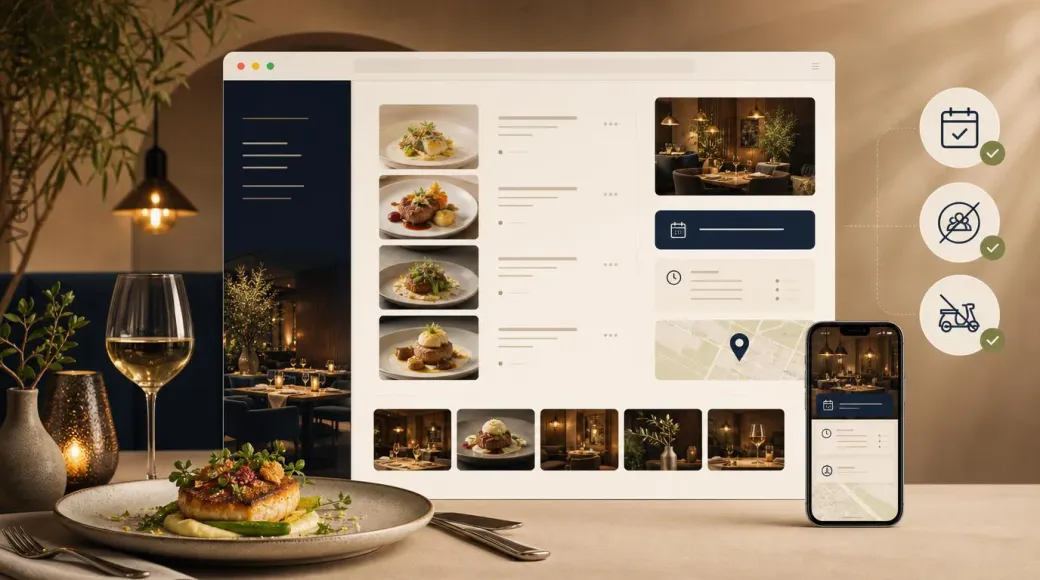 © Velvionix
 Important notice Legal, tax and industry-specific information concerns Germany and expressly identified EU law. It is provided for general orientation and does not replace individual advice. Last review of the cited legal situation: July 2026 Show the full notice
Unless stated otherwise, the legal, tax or industry-specific information on this page reflects the law applicable in Germany and German official and professional practice. Directly applicable EU law and references to other jurisdictions are identified separately. The information was researched with due diligence using sources available as of the stated review date. For binding guidance on your specific project, please contact the competent chamber or a qualified specialist, such as a lawyer or tax adviser. The current statutes and official regulations always prevail.
The Essentials for Restaurants
Why Restaurants Should Not Rely Only on Portals
Many restaurants are found first through Google, maps apps, reservation portals or recommendations. That helps, but it has one weakness: the first impression is often not fully controlled by the restaurant itself. An old menu photo, wrong opening hours, third-party logos or competing suggestions right next to the listing can turn real interest into a lost guest.
A strong website for restaurants is therefore not just a digital shop window. It is the restaurant’s own place for menu, atmosphere, reservation, opening hours, location, photos and trust. Restaurants that already get found through recommendations or a business profile use the website to turn that attention into a concrete reservation.
The goal is not to switch off all portals. For some restaurants, reservation or delivery platforms remain useful. But the own website should be the strongest direct path. When a guest searches for the restaurant name, they should not have to move first through third-party profiles, outdated menus or intermediaries.
The Menu Must Be Current and Readable
The menu is the most important piece of content for a restaurant. Yet online it is often the weakest part: last year’s PDF, a photo of the menu outside, unclear prices, missing vegetarian or vegan notes, no allergen information or a menu that is barely readable on mobile.
A website menu should be built as a structured page. Categories such as starters, mains, pizza, pasta, desserts, drinks or lunch menu help guests quickly decide whether the restaurant fits. Short descriptions make the difference: no inflated wording, just clear information about flavour, ingredients, preparation and special features.
If the menu changes frequently, maintenance needs to be realistic. A weekly menu, seasonal menu or daily special should not depend on someone exporting a new PDF every time. Either the restaurant needs a simple editing flow, or updates are included in ongoing care. An outdated menu costs trust because guests notice immediately when website and reality do not match.
Reservation Is Not a Footer Detail
Anyone searching for a restaurant on mobile often has a concrete intent: dinner tonight, table for four, birthday, business meal, terrace, high chair or a short-notice plan after an appointment. The reservation path must therefore be visible before the guest gets tired.
For small restaurants, a tappable phone button can remain the most important path. For others, a short reservation form with date, time, number of guests and return contact fits. Restaurants with higher volume can embed an external reservation widget if it is maintained operationally. Velvionix does not rebuild restaurant-management systems, but can integrate existing systems cleanly when the provider offers a stable technical option.
The boundary matters: a table reservation is different from a binding order. A table request should not sound like a purchase process. Pre-orders, pickup or delivery can be useful, but they need clear copy, matching confirmations and professionally checked workflows.
Photos Decide Appetite and Trust
For restaurants, photos decide faster than long text. Guests want to see whether the atmosphere fits: cosy, modern, family-run, premium, fast, regional, Italian, Asian, vegan, rustic or refined. Good images show not only plates, but also room, light, details, team and real mood.
Stock photos are particularly dangerous in gastronomy. A perfect dish that does not come from the kitchen does not help. A few real, clean photos are better than a gallery full of interchangeable visuals. If good photos do not exist yet, the website should not pretend they do. A small shoot is often a better investment than another portal profile.
Imagine a restaurant that is often found through recommendations but has no website of its own. Google shows opening hours, some guest photos and an old menu. The new website starts deliberately lean: strong homepage, current menu, reservation path, opening hours, directions and a small real gallery. It does not replace restaurant management. But it makes the first visit feel less uncertain.
Local Search Needs More Than a Google Listing
Restaurants live from local searches. People search by cuisine, place, occasion and proximity: Italian restaurant in the city, lunch menu nearby, restaurant with terrace, vegetarian food or good dinner after the theatre. A maintained Google Business Profile matters, but it should work together with the own website.
Name, address, phone number, opening hours and reservation link must be consistent across website, business profile and portals. When Google shows different opening hours than the website, guests feel uncertainty. When the website has a current menu but the business profile shows an old menu photo, friction appears again.
Structured data can help search engines understand restaurant type, opening hours, address and menu information. It does not replace a good menu or real photos. But it makes the technical foundation match the visible information.
Legal and Operational Boundaries Need Calm Clarity
Restaurant websites quickly touch regulated topics. Allergens and additives need to be understandable for guests. For online offers or pre-orders, certain information may be relevant before a decision. At the same time, a website should not make promises the team cannot deliver in everyday operations.
The right solution depends on the restaurant. A classic table-service restaurant usually does not need shop logic. A business with pickup or delivery needs clear order or enquiry paths. If a specialised delivery, POS or reservation system is already in use, it should not be hidden but linked or embedded cleanly. Velvionix does not build custom checkout or payment flows for restaurants, but can connect suitable external systems transparently with the website.
Privacy also belongs here. A simple reservation request should ask only for information that is truly needed. Special wishes can be helpful, but form fields should not invite unnecessary sensitive details. Larger tools, newsletters, review widgets or map embeds need careful integration and a matching privacy notice.
The Real Effort: The Website Must Fit Restaurant Life
A restaurant website is only strong when it can be maintained. Opening hours change, holidays appear, menus rotate, events happen, photos age, delivery times shift and reservation tools are adjusted. If every change is technically difficult, the website stops moving.
That is why the first version should be deliberately lean: homepage, menu, reservation or contact, gallery, opening hours, location and required legal pages. Multilingual content can make sense when tourism, international guests or an English-speaking audience are relevant. A blog is useful for restaurants only when topics and maintenance capacity really exist.
The best restaurant website is not the one with the most effects. It is the one that works every day: guests understand the cuisine, find the menu, reserve without detours and know when they can come.
What Often Weakens Restaurant Websites
Common Questions About Restaurant Websites
Does a restaurant need its own website if it is visible on Google?
Yes, if menu, reservations, photos and opening hours should stay controlled and current. Google and portals help visibility, but they do not replace the restaurant's own presence.
Should the menu be a PDF or a website page?
A real website page is usually better: easier to read on phones, easier to update and easier for search engines to understand. PDFs can supplement it, but should not be the only menu.
Can Velvionix integrate a reservation system?
Velvionix can integrate existing reservation systems via link, widget or iframe when the provider supports it technically. We do not rebuild a custom restaurant-management system.
What about pickup or delivery?
Pickup and delivery can be shown clearly. For true order and payment flows, specialised systems are usually the better fit; Velvionix connects those systems transparently with the website.
Which photos does a restaurant website need?
Real photos of dishes, room, exterior, details and team matter most. A few high-quality images are better than many generic visuals or stock photos.
What does a website for a restaurant cost?
It depends on scope, menu maintenance, photos, reservation path, multilingual content, forms, external widgets and ongoing care. For many restaurants, a lean and well-maintained start is enough.
Plan Your Restaurant Website Now
If you are planning your own restaurant website, the website for restaurants page shows the relevant building blocks for menu, reservations, photos, opening hours and local visibility.
Sources
Notice: The respective providers or operators are solely responsible for the content of external links.
- [1] Google Business Profile Help : "Get started with a Business Profile for your restaurant"
https://support.google.com/business/answer/14189260?hl=en - [2] Google Business Profile Help : "About the menu editor"
https://support.google.com/business/answer/9455840 - [3] Google Business Profile Help : "Tips to improve your local ranking on Google"
https://support.google.com/business/answer/7091 - [4] DIHK : "Lebensmittelkennzeichnung im Gastgewerbe"
https://www.dihk.de/resource/blob/3808/e96f9a3058bd78bcc8c8ce03dda08240/merkblatt-lebensmittelkennzeichnung-data.pdf - [5] Bundesministerium für Ernährung, Landwirtschaft und Heimat : "Allergenkennzeichnung ist Pflicht"
https://www.bmleh.de/DE/themen/ernaehrung/lebensmittel-kennzeichnung/pflichtangaben/allergenkennzeichnung.html - [6] DEHOGA Bayern : "Reservate - Das neue Restaurant Management System"
https://www.dehoga-bayern.de/aktuelles/detailansicht/article/reservate-das-neue-restaurant-management-system/ - [7]
- [8] Nielsen Norman Group : "'Contact Us' Page Guidelines"
https://www.nngroup.com/articles/contact-us-pages/ - [9] W3C Web Accessibility Initiative : "The Business Case for Digital Accessibility"
https://www.w3.org/WAI/business-case/
Comments
No comments yet.
Comments disabled
Comments are disabled for this article because the topic may involve sensitive legal, professional or personal information.