Interactive Website: Guide Visitors Through Complex Content
An interactive website can guide visitors through complex content on a voluntary path. A website assistant and a spotlight are not AI chatbots.
Published: · Updated:
 © Velvionix
 Many websites already have enough content. What they lack is a visible order. Visitors open a page about an offer, a form of therapy, a comparison or a process and first see numerous sections, cards and links at once. They can move freely through the page but quickly lose the thread.
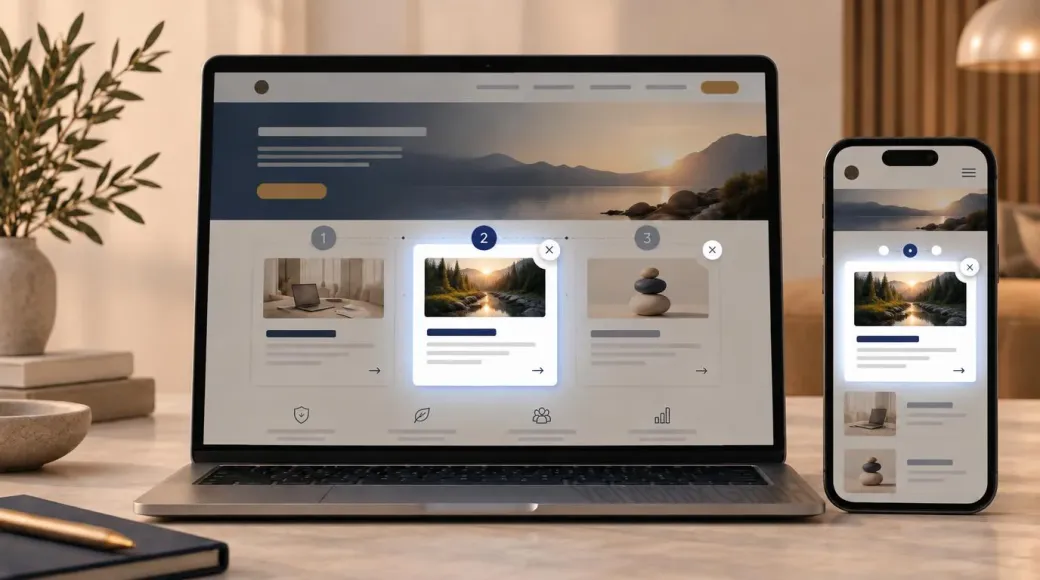
An interactive website does not fix that by adding more text. It offers a voluntary path. A website assistant or a spotlight can show the next useful step without dictating how they use the site.
Key takeaways
Why visitors leave complex pages
People scan websites. They rarely read from top to bottom in the order the text was written. When important decisions sit across several blocks, the page feels crowded even when every fact is correct.
This becomes visible especially quickly when an offer has several variants, a process has several steps or a comparison explains different criteria. The homepage or service page then names everything at once. Someone who only wants a starting point first sees the amount of information.
Leaving the page does not always mean the copy is weak. It often means the next useful action is not visible. Anyone who then has to search opens a second menu, goes back or leaves.
Voluntary guidance helps at exactly that point. It does not replace navigation or clear headings. It makes visible which section comes next if someone wants to understand the offer.
What an interactive website can do
Interactive does not mean animation for its own sake. It means an interface that reacts to a deliberate action and offers a sequence.
Typical forms are a website assistant that walks through selected stops, and a spotlight that highlights one area while the rest of the page stays visible. Both can be integrated into an existing website. They do not need a chat window or a synthetic voice.
The benefit is concrete:
- A complex offer is split into understandable stops.
- A process is shown in the order it later actually happens.
- A comparison is not simply presented in a table but explained step by step.
The visitor stays free. Guidance is an offer, not a requirement. Anyone who wants to read the page alone must still be able to do that.
A public example of this idea is the virtual website assistant. It shows how guidance can look without turning into a chatbot.
Website assistant and spotlight: how the guidance works
A website assistant is a guided sequence. It names the current step, briefly explains why that step matters and then offers a next one. The wording stays factual. There is no pretend advice and no answers to open questions.
A spotlight works differently. It highlights one area of the existing page, such as an offer, a price range or a process step. The rest of the page stays readable. Nobody is locked into an overlay.
Both patterns follow the same rule: the guidance may only show what the page already states. It must not invent new promises or decide for the visitor.
Good guidance is also visibly controllable. Start, pause, next and close must be clear. Anyone who stops returns to the normal page, not to a dead end. The same applies on a phone: controls must stay reachable and must not cover the content permanently.
Progressive disclosure helps here. Instead of showing every detail at once, the next block appears only when the visitor deliberately opens it. That reduces load without removing content.
Accessibility must also be taken into account. Keyboard focus must stay visible, motion must be reducible, and the path must not hide content that should remain available without the tour. Starting the tour with a mouse or by touch is fine. It must also be possible to open, continue and close it with the keyboard. Otherwise the visitor gets stuck in the tour and cannot return to the normal page.
For search engines the limit is simple: important content and links must stay crawlable. Guidance may highlight sections. It must not hide them behind an interface that is unreachable without JavaScript or without starting the tour.
What this is not: a chatbot
A website assistant is not an AI chatbot. It does not answer open questions, does not make a diagnosis and does not replace advice. It only knows the stops that were prepared editorially.
That is deliberate. A chat window often looks like an information desk. Anyone who enters a question there expects an answer that relates to their own situation. A guided website cannot do that and should not pretend to.
For health, therapy or other sensitive topics, chat is the wrong form. The interactive guidance is limited to publicly available content: process, offer, comparison and next step. Personal details do not belong in this interface.
The assistant is not a search engine either. Anyone looking for a concrete term still needs headings, a table of contents or ordinary navigation.
When the effort is worth it
The work is worth it when the page stays hard to scan without guidance. Typical cases are several offers on one page, a multi-step process or a comparison that would otherwise be presented only as a long list.
A very short page with one clear offer and one visible next step often does not need extra guidance. Headings, subheadings and a recognizable contact or booking path are then enough.
The ongoing maintenance effort also needs to be considered. Every guided stop must match the current page. If an offer, a price range or a process changes, the guidance must also be reviewed. Otherwise the assistant shows something the page itself no longer says.
If you want to check whether interactive guidance fits your website, the next step is the Design, media and interaction page. There you can see what Velvionix implements and what stays outside the offer.
A chatbot will not fix missing guidance
prefers-reduced-motion should be respected.
Frequently asked questions
What is an interactive website?
An interactive website offers voluntary guidance through existing content. Typical forms are a website assistant or a spotlight. The page stays usable in the ordinary way.
Is a website assistant automatically an AI chatbot?
No. The assistant follows prepared stops. It does not answer open questions and does not replace advice.
Can a website tour hurt SEO?
Yes, if important content or links are only accessible through the tour and therefore become harder for search engines to reach. A voluntary guided experience that uses existing, normally linked sections is generally not a problem.
Does a guided tour work on a phone?
Yes, if start, next and close stay large enough and reachable, and the content is not covered permanently. A tour that blocks the phone screen does not help.
What matters for accessibility?
Keyboard use, a visible focus, reducible motion and a clear exit. The page must stay fully usable without the tour.
Which websites benefit from a guided assistant?
When offers, processes or comparisons stay hard to scan without a sequence. A short page with one clear next step often does not need it.
Can this kind of interaction be added later?
Yes. Many sites start with a clear structure and add guidance once content, processes or comparisons actually need it. The stops then have to match the current page.
Put an interactive website in context
The page Design, media and interaction shows how Velvionix implements a website assistant, spotlight and clear user guidance. A public example is the virtual website assistant. If you want to clarify the right next step for your site, you can then use the contact page.
Sources
Notice: The respective providers or operators are solely responsible for the content of external links.
- [1]
- [2] W3C Web Accessibility Initiative : "Understanding Success Criterion 2.4.7: Focus Visible"
https://www.w3.org/WAI/WCAG22/Understanding/focus-visible.html - [3] W3C Web Accessibility Initiative : "Understanding Success Criterion 2.1.2: No Keyboard Trap"
https://www.w3.org/WAI/WCAG22/Understanding/no-keyboard-trap.html - [4] MDN Web Docs : "prefers-reduced-motion"
https://developer.mozilla.org/en-US/docs/Web/CSS/Reference/At-rules/@media/prefers-reduced-motion - [5] Google Search Central : "SEO Link Best Practices for Google"
https://developers.google.com/search/docs/crawling-indexing/links-crawlable - [6] Nielsen Norman Group : "Progressive Disclosure"
https://www.nngroup.com/articles/progressive-disclosure/ - [7] Page Laubheimer / Nielsen Norman Group : "Onboarding Tutorials vs. Contextual Help"
https://www.nngroup.com/articles/onboarding-tutorials/


Comments
No comments yet.
Be the first to comment!
Write a comment
To write a comment, please enable the comment function in your privacy settings.
Write a comment