Google Cannot Find Your Website: What Helps Now
Google barely shows your website? Clear structure, relevant content and technical quality improve the foundation you can control.
Published: · Updated:
 © Velvionix
 Key Takeaways
Improve Visibility With Clear Signals
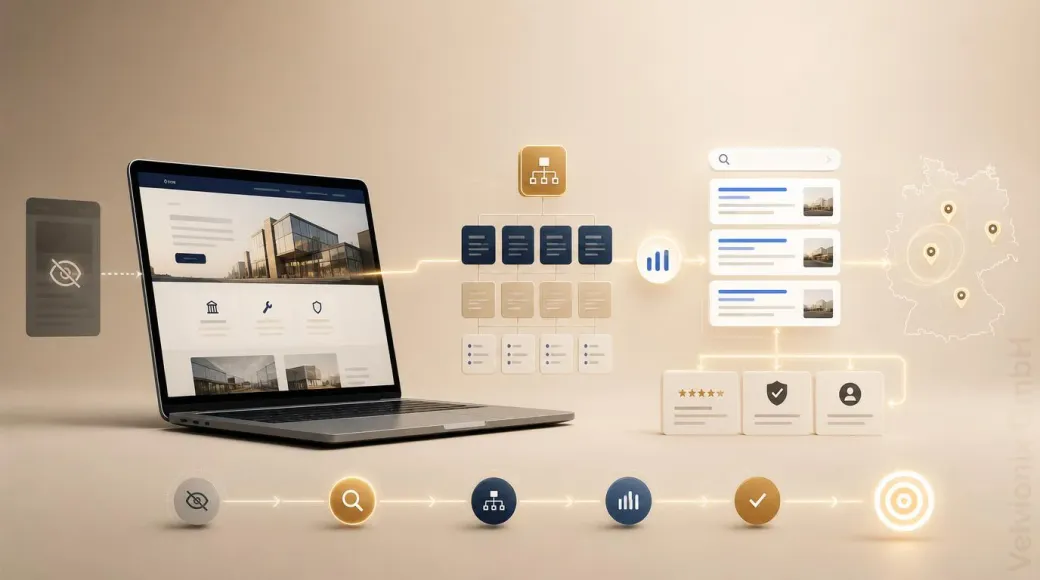
If Google barely shows your website, you can influence more than you might think. Clear service pages, understandable search topics, internal links, a defined service area, technical accessibility and visible trust signals give search engines better context and give visitors a clearer way to inquire.
Velvionix treats these elements as one connected task through organic visibility: Which search question should each page answer, which content creates clarity and trust, and where does the technical foundation get in the way? The result is not a loose keyword package, but a website structure that makes sense to people and search engines.
For a quick technical view, start with the free website check. It examines the delivered HTML of one public URL. If it surfaces several fundamental findings there, other important pages and the overall structure should be reviewed professionally before deciding between targeted corrections and a new, clearly structured website.
The caveats then help set realistic expectations. Submitting a sitemap does not guarantee fast indexing, new domains often need time, and no responsible provider can promise fixed rankings. The useful work is to improve controllable signals consistently and track how they develop.
Indexed Does Not Mean Visible
Indexing is only the entry ticket. An indexed page can still be shown rarely if Google does not consider it strong enough for relevant queries. A page can also appear in Search Console, but only collect impressions for loosely related or irrelevant terms.
For small businesses, this distinction matters. The question is not only: “Is the page on Google?” A better question is: “For which problems, services and audiences should this page be found?” If the answer is not clear on the website, Google also has a hard time assigning it.
A homepage with general statements is rarely enough. Searchers ask concrete questions: website creation for a small business, modernize a practice website, bakery website, make a website visible without a Google Business Profile, improve website inquiries. Each search intent needs a suitable page or at least a clear section that answers the question.
What Google Needs to Understand
Search engines do not only read individual words. They evaluate context: page titles, headings, visible paragraphs, internal links, image context, technical accessibility, recurring terms and external signals. Search engines can understand a website more easily when every important page has a clear purpose.
A service page should not only say that you offer “individual solutions”. It should explain who the service is for, which problem it solves, how the process works and which next step makes sense. A page about nationwide digital collaboration should not sound as if only a local in-person visit is possible. A contact page should not only show a form, but make the inquiry path feel clear.
Internal links also help with understanding. When a blog article about missing inquiries points to website check, website creation and organic visibility, a logical relationship emerges. If pages sit next to each other in isolation, Google has to infer more of the structure itself.
Why New Websites Often Start Slowly
Longer-established websites may have built more visible traces across the web, such as mentions, links, business profiles, reviews and useful content. Domain age alone does not guarantee rankings. A new website often starts with fewer external signals and must first demonstrate its topical relevance and credibility clearly.
Nationwide service providers without a traditional storefront face an additional task. They cannot rely only on local proximity. The website has to explain more clearly for which services, industries, problems and service areas it is relevant. That takes more than a polished homepage.
Clearly connected subject areas help: service pages for concrete offers, blog articles for real audience problems, understandable references, consistent business data and a contact path that is not hidden. Google needs to recognize that the website does not merely exist, but could be a helpful result for specific searches.
What to Check First
Start with the basics: use Google Search Console to check whether important pages are indexed and whether there are crawl or indexing issues. The URL Inspection Tool shows what Google knows about an individual URL. A sitemap helps discovery, but it does not replace quality or relevance.
Then look at the technical foundation of key pages. The free website check can inspect one public URL for technical and search-relevant weaknesses. It does not replace a full SEO strategy or performance measurement, but it surfaces structural findings that deserve closer review.
The content check comes next. Is there a clear main service? Are important search questions visibly answered? Are there proof points, references or process details? Are prices or packages at least explained well enough for orientation? Is the service area understandable? Are meaningful internal links used?
Practical Example: Good Website, Unclear Search Role
Imagine a small business offering digital services nationwide. The website is modern, fast and technically reachable. Still, Search Console shows barely any impressions. When reading the site, one issue stands out: the homepage talks generally about quality and individual solutions. The service pages explain a lot, but mention concrete audience problems too late. Blog articles exist, but do not intentionally lead to matching services.
For visitors who already know the business, the website feels credible. For search engines, its role is too vague. Which search query should which page answer? Why is this page more helpful than older, stronger domains? Which proof points show that there are real services behind it?
A stronger structure would separate the most important services more clearly, connect blog articles to concrete problems, set internal links more deliberately and make trust more visible. This is not a ranking guarantee. It is the foundation for being understood for the right topics in the first place.
How Visibility Develops Over Time
Organic visibility is not a switch. A website goes live, but trust, relevance and search signals develop over time. New content needs to be discovered, interpreted and connected. Old content needs maintenance when services, prices, industry focus or examples change.
The effort is therefore a steady rhythm: check the technical foundation, sharpen important pages, add problem-oriented content, improve internal links, maintain credible external profiles and use Search Console to see which pages are gaining impressions and improving their positions. Those signals show where further work is most likely to be useful.
The important balance is patience without passivity. Waiting alone rarely helps. Every new page should have a clear purpose, and every improvement should make the path from search query to trust and inquiry a little easier.
What Keeps Visibility Low
Frequently Asked Questions When Google Barely Shows a Website
Why can Google not find my website?
Possible causes include missing indexing, technical blocks, weak internal links, unclear content, limited trust signals or simply a very new domain.
Is submitting a sitemap enough?
No. A sitemap helps with URL discovery, but it does not replace clear structure, helpful content, technical accessibility and trust signals.
How long does it take until a new website becomes visible?
No serious provider can guarantee that. New domains often need time. The key is to improve controllable foundations and watch Search Console closely.
Should I write more blog articles?
Yes, if they answer real audience problems and lead naturally to services or next steps. Generic articles without clear links to relevant services or next steps rarely help.
Why are older competitors found despite poor websites?
Longer-established websites may already have more visible mentions, links, reviews or useful content. That is not an automatic quality signal or permanent advantage, but it can explain part of their head start.
Can Velvionix guarantee rankings?
No. Velvionix improves controllable foundations: website structure, technical quality, relevant content, service area, internal links and trust signals.
Choose the Right Foundation for Visibility
If your website is technically accessible but barely appears for relevant searches, organic visibility is the right path. We connect clear page purposes, relevant content, service area, internal links, technical quality and trust signals without promising fixed positions.
Use the free website check for an initial view of the delivered HTML of one public URL. If it surfaces several fundamental findings, we can review other important pages and the overall structure. Only then can you judge whether targeted corrections are enough or whether building a website from the ground up would provide a more suitable base.
Sources
Notice: The respective providers or operators are solely responsible for the content of external links.
- [1] Google Search Central : "SEO Starter Guide"
https://developers.google.com/search/docs/fundamentals/seo-starter-guide - [2] Google Search Central : "Sitemap best practices"
https://developers.google.com/search/docs/crawling-indexing/sitemaps/overview - [3] Google Search Console Help : "URL Inspection Tool"
https://support.google.com/webmasters/answer/9012289 - [4] Google Search Central : "Creating helpful, reliable, people-first content"
https://developers.google.com/search/docs/fundamentals/creating-helpful-content - [5] Google Search Central : "In-Depth Guide to How Google Search Works"
https://developers.google.com/search/docs/fundamentals/how-search-works - [6] Google Search Central : "Google Search Technical Requirements"
https://developers.google.com/search/docs/essentials/technical - [7] Google Search Central : "Ask Google to Recrawl Your URLs"
https://developers.google.com/search/docs/crawling-indexing/ask-google-to-recrawl - [8] Google Search Central : "SEO Link Best Practices for Google"
https://developers.google.com/search/docs/crawling-indexing/links-crawlable - [9] Google Search Console Help : "Performance Report"
https://support.google.com/webmasters/answer/7576553


Comments
No comments yet.
Be the first to comment!
Write a comment
To write a comment, please enable the comment function in your privacy settings.
Write a comment