Start Professionally: Email, Calendar, and Files That Build Trust
2026-02-04
This image is protected by copyright. Use only with explicit permission.
© 2026 Velvionix
Key Takeaways
Why the First Impression Often Doesn’t Happen on Your Website
First impressions count, and they often don’t happen on your website but in the first email and the first scheduling proposal. An address like name@gmail.com or something@yahoo.com sends a clear message: This is a side project. Even if you work excellently, you have to correct that gut feeling in your counterpart first.
Then there’s daily stress: appointments are coordinated through back-and-forth emails, invitations are missing, documents are somewhere in chats, on the desktop, in the downloads folder. This doesn’t just look messy - it leads to real problems: wrong versions, forgotten attachments, missed appointments, unnecessary follow-ups.
And then it gets expensive, even though it’s “just organization.” Every minute of searching, every misunderstanding, every embarrassing wrong attachment costs time and trust. For freelancers and small businesses, this is particularly painful because there’s barely any buffer.
The Three Pillars of Professional Communication
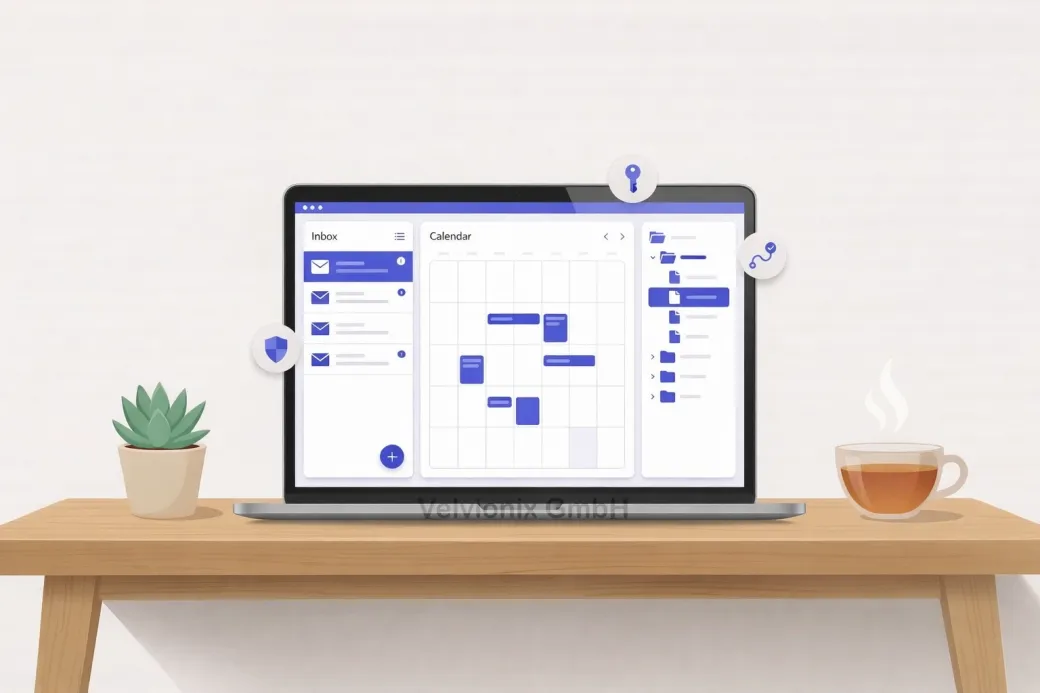
Professional communication isn’t a luxury. It’s a simple system of three pillars: an email address that fits your brand; a calendar that works reliably; file storage that enforces order instead of allowing chaos.
Email: Control Instead of Freemail
Let’s start with email. Your own domain isn’t just about looks - it’s about control. You can use addresses like info@, billing@, or appointments@ without managing multiple separate mailboxes (with their own logins). For customers, this immediately feels more committed, and for you, it becomes easier to cleanly separate responsibilities.
If you work alone, a central mailbox plus targeted forwarding or additional addresses that run into the same mailbox in the background is often enough. This keeps work manageable, but externally it looks like a professionally organized business.
If you work with employees or external partners, you need separate access and clear rules about who sees which mailboxes. Anything else ends in password sharing and chaos.
Calendar: Appointments as Time Capital
The calendar is the second lever because it directly relates to revenue. Appointments are your time capital. A functioning calendar means: invitations that arrive; clear times; clean reminders; no double bookings. Most importantly, it means: customers feel guided.
If you regularly schedule appointments, you shouldn’t negotiate each time about who’s available when. A clear process makes sense: fixed time slots, clear duration, automatic confirmation.
If you work more project-based, a clean calendar with consistent entries is often enough, including location or link and a brief agenda. The difference isn’t technology but discipline.
File Storage: Order That Protects Trust
The third pillar is file storage. Many underestimate how quickly documents can destroy trust: wrong attachment, outdated version, invoice not findable, contract somewhere. These are the small things by which professionalism is measured in daily life.
If you create documents for customers, you need a structure that immediately makes clear: What’s current, what’s final, what’s internal. A simple logic is enough if it’s consistent: one folder per customer; within it offers, contracts, invoices, content, project documents; plus clear file names with date or version. This avoids the classic “final_final_v3”.
Three Decisions for a Professional Start
Three clear decisions quickly get you into a professional state: If you regularly work with customers via email, use a domain address and define at least one general address for inquiries plus one for billing. If appointments are part of your business, maintain a calendar that reliably handles invitations and reminders, and consistently use the same process for appointment confirmation. If you search for files more than once a week or mix up versions, a clear folder structure isn’t “nice to have” but an immediate time saver.
Case Study: Small Studio Without Clear Communication
A small studio had inquiries via a freemail address and coordinated appointments via messenger. Customers constantly asked whether the appointment was “really scheduled,” and documents got lost. After switching to a domain address, fixed calendar invitations, and simple storage per customer, follow-up questions became significantly fewer, and the studio immediately seemed more reliable without changing its offering.
Security: Foundation, Not Extra
A point that’s often suppressed: security. You don’t have to be IT experts, but you must take basics seriously. A single compromised mailbox can paralyze your appointments, customer communication, and access to tools. Therefore: strong passwords, two-factor authentication, no shared logins, and access only where really necessary.
The Real Effort - Unvarnished
Realistically about effort: The setup costs some time once, depending on the starting point. The bigger part is ongoing maintenance: following rules, not diluting folder structure, keeping the calendar clean, not using the inbox as storage. If you take this seriously, you gain peace and speed. If you let it slide, you’re back to the old chaos in three months - just with more expensive tools.
What Destroys Professionalism in Daily Work
Common Questions About Email, Calendar, and File Storage
Isn't a Gmail or Yahoo mailbox enough?
Technically yes, but the first impression suffers. A domain address appears more committed and is easier to scale when you grow.
How many email addresses do I need as an individual?
Few. Usually a general address for inquiries and one for billing is enough, both can be forwarded to a central mailbox.
Do I need to buy a complete "office suite" right away?
Not necessarily. What matters is that email, calendar, and file storage work together reliably and you use it consistently.
What's the most common calendar mistake?
Appointments aren't properly confirmed or aren't completely entered. This generates follow-ups and appears unreliable.
How do I prevent chaos with files?
With a simple structure per customer and clear file names. What matters isn't perfection but consistency.
What's the economic benefit?
Less search time, fewer errors, fewer follow-ups, and a professional impression that makes decisions faster.
How important is security really?
Very important. A compromised mailbox can paralyze communication and access to tools. Basic protection is mandatory, not an extra.
Start Professionally Now - Without Chaos
If you want to solve this topic properly, we implement it as part of our services in a structured way - not as a loose individual measure. Please use the contact form and select the appropriate options. We will get back to you with a brief assessment of the most sensible approach.
Sources
Disclaimer: The operators of linked pages are solely responsible for their content. We assume no liability for linked content. This article was created with the assistance of AI-powered research and writing tools.
- [1] Google : "Create a custom email address using your domain"
https://support.google.com/a/answer/33327 - [2] Microsoft : "Connect your domain to Microsoft 365"
https://learn.microsoft.com/en-us/microsoft-365/admin/setup/domains-faq - [3] BSI : "Digitaler Selbstschutz: Passwortschutz"
https://www.bsi.bund.de/DE/Themen/Verbraucherinnen-und-Verbraucher/Informationen-und-Empfehlungen/Onlinekommunikation/Passwoerter/passwoerter_node.html - [4] Microsoft : "Multi-factor authentication overview"
https://learn.microsoft.com/en-us/entra/identity/authentication/concept-mfa-howitworks - [5]
Related Articles
This image is protected by copyright. Use only with explicit permission.
© 2026 Velvionix
Professional Presence: How to Build a Website That Pays Off
2026-02-03

This image is protected by copyright. Use only with explicit permission.
© 2026 Velvionix
Around the Clock: How an AI Assistant Secures Your Inquiries
2026-02-03
This image is protected by copyright. Use only with explicit permission.
© 2026 Velvionix
One-Pager or Clear Structure: Why Multiple Pages Often Sell Better
2026-02-02
Comments
No comments yet.
Be the first to comment!
Write a comment
To write a comment, please enable the comment function in your privacy settings.
Write a comment